The post Install Java on Windows for Hibernate appeared first on OctopusCodes.
]]>
Step 2: Click on “Yes” button.

Step 3: Click on “Next” button
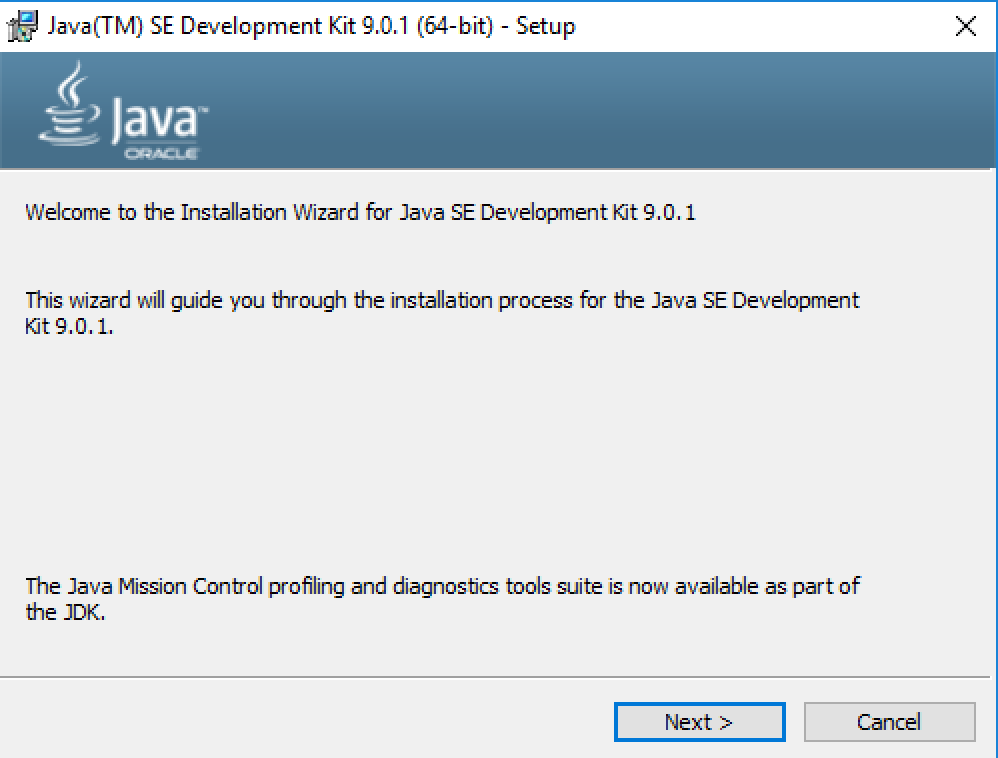
Step 4: Click on “Next” button
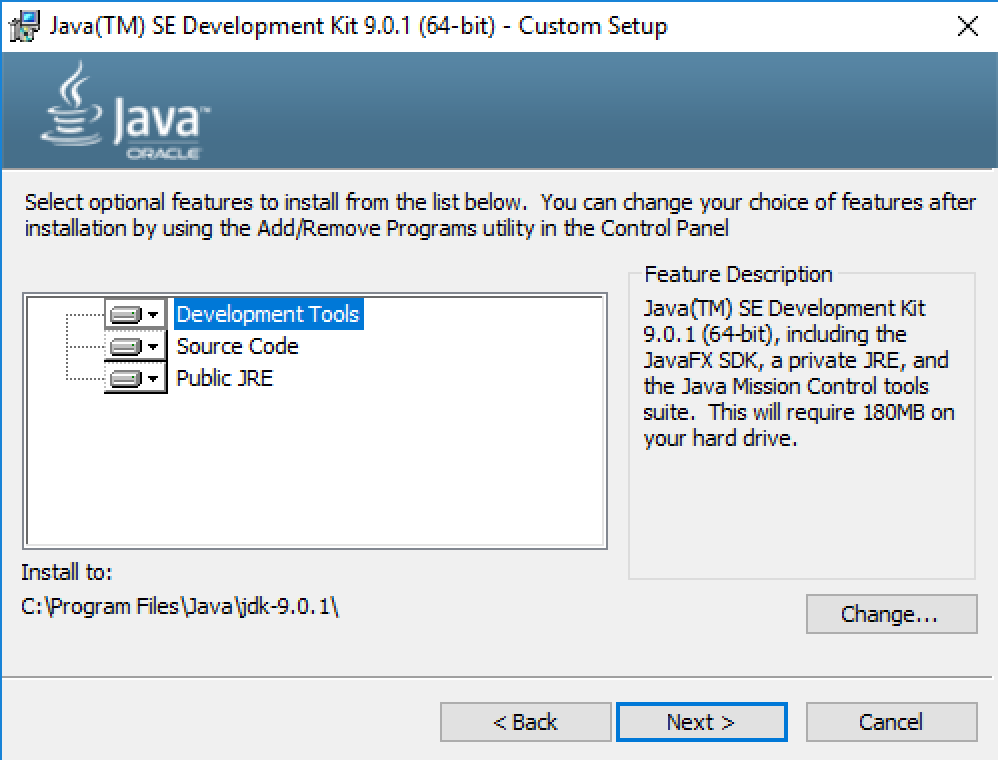
Step 5: Click on “Next” button

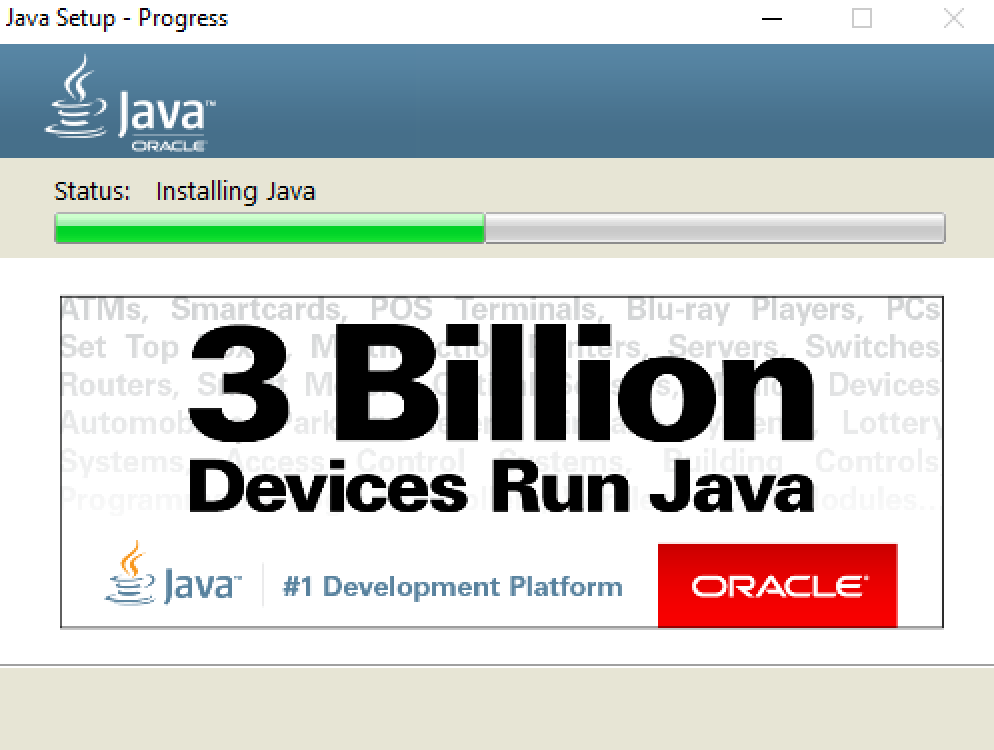
Step 6: Click on “Close” button
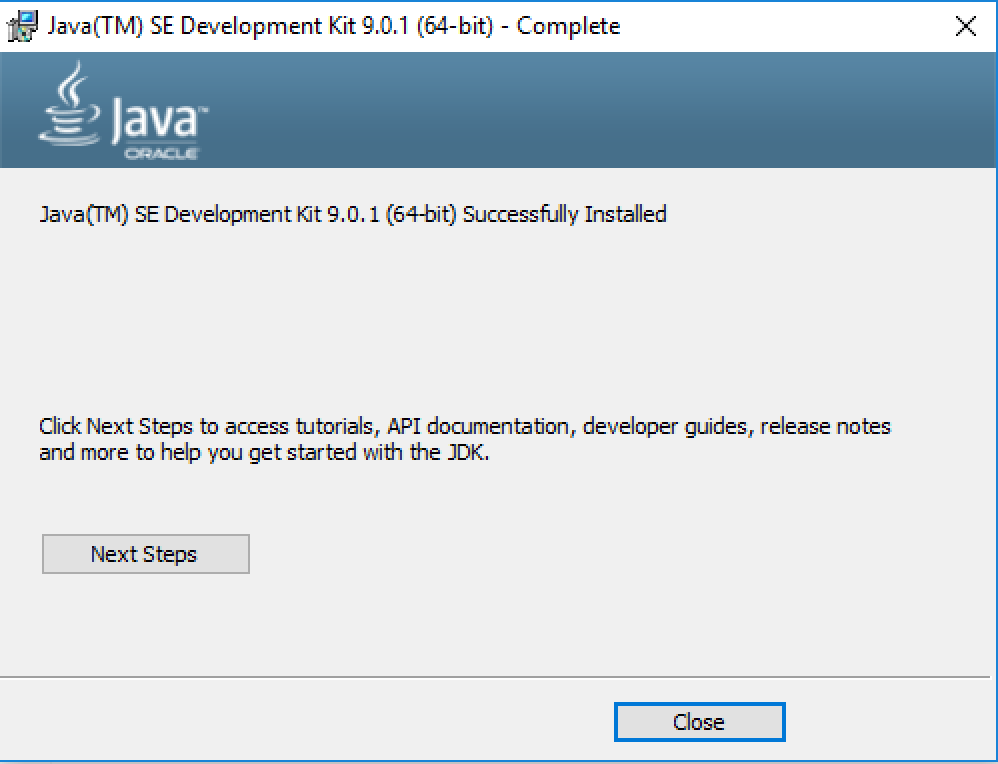
The post Install Java on Windows for Hibernate appeared first on OctopusCodes.
]]>The post Install MySQL for Hibernate appeared first on OctopusCodes.
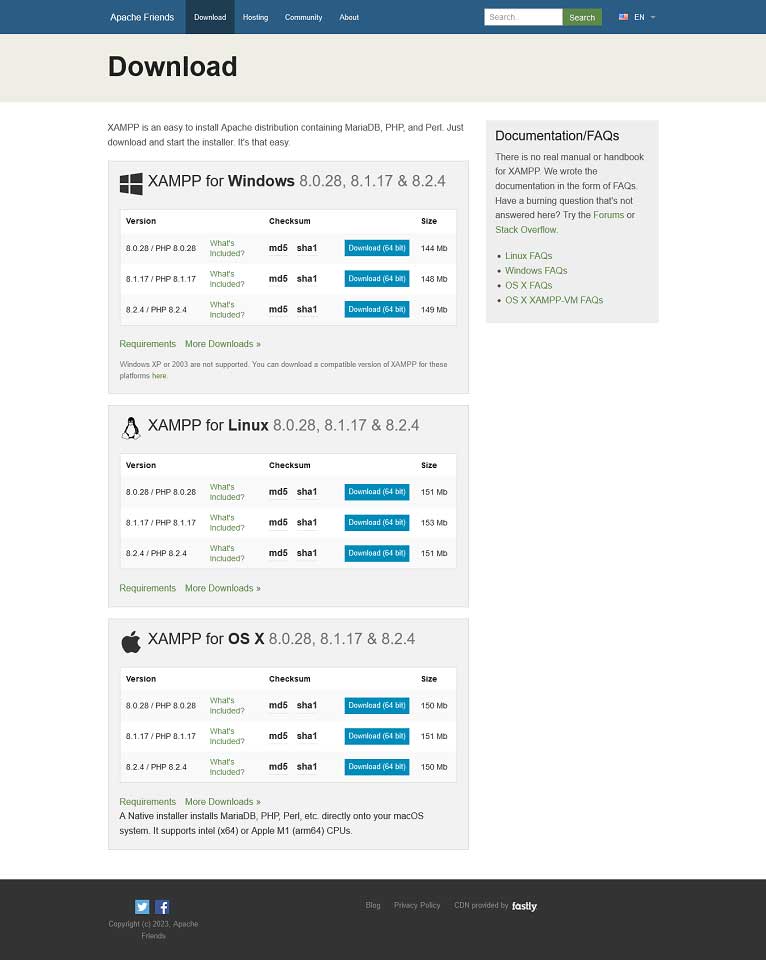
]]>
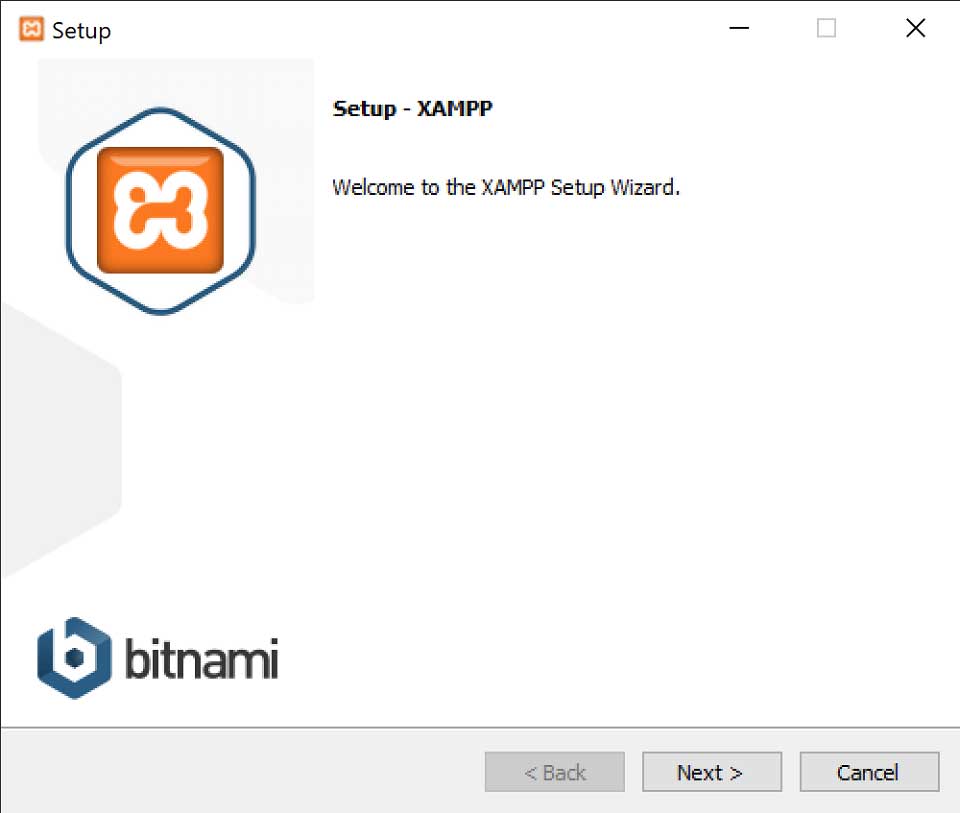
Step 2: Follow the instructions to install XAMPP.
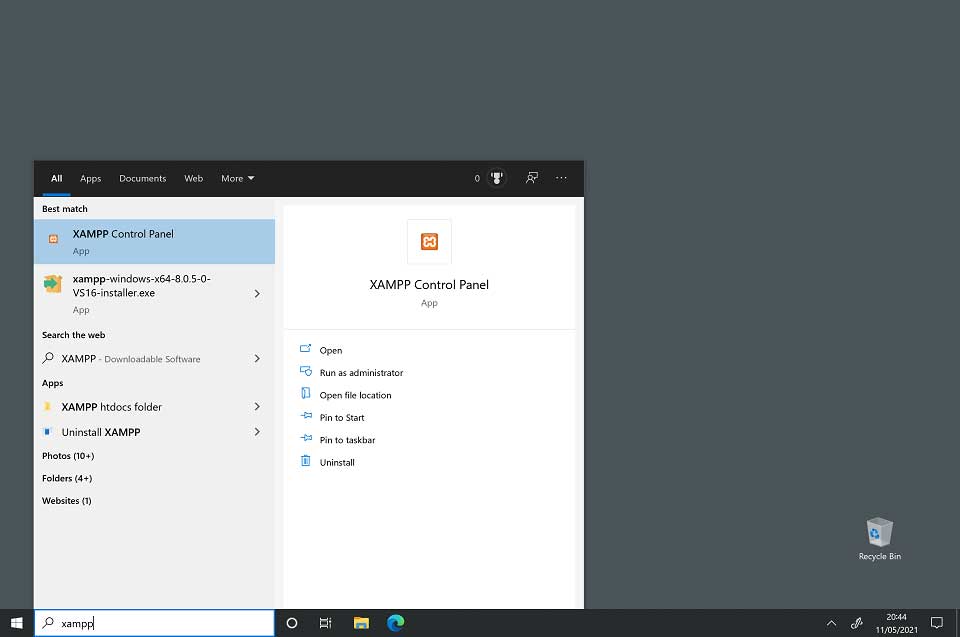
Step 3: To start XAMPP, type XAMPP into the search bar. Then select the XAMPP Control Panel to start XAMPP.
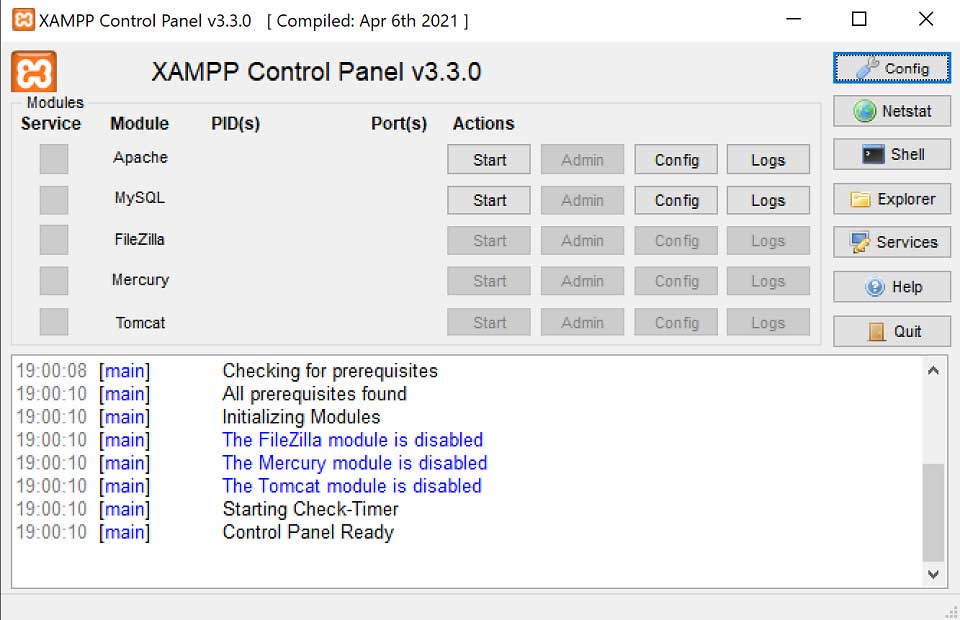
Step 4: The Start button for Apache is used to start the Apache web server (and then stop it when it is started). The Start button for MySQL will start the MySQL database (and then stop it when it is started).
The post Install MySQL for Hibernate appeared first on OctopusCodes.
]]>The post Download and Install Eclipse to Run Hibernate appeared first on OctopusCodes.
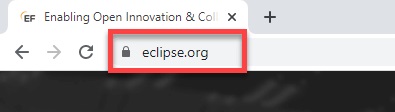
]]>Step 1: Open your browser and type https://www.eclipse.org/
Step 2: Click on “Download” button.

Step 3: Click on “Download 64 bit” button
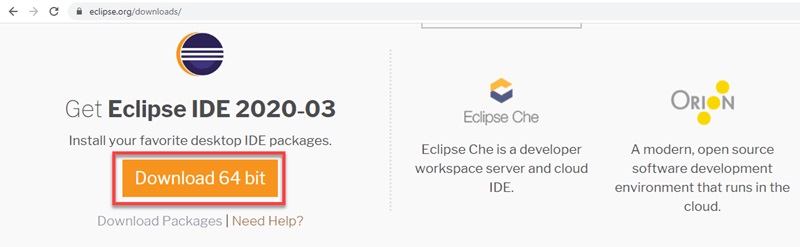
Step 4: Click on “Download” button
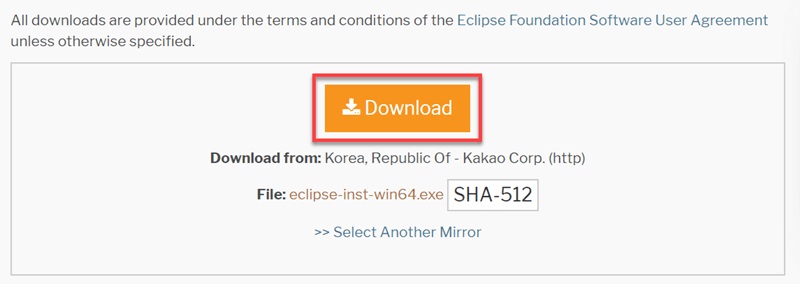
Step 5: Click on “eclipse-inst-win64.exe” file to install Eclipse

Step 6: Click on “Eclipse IDE for Java Developers“
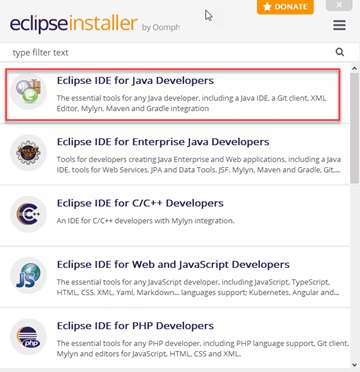
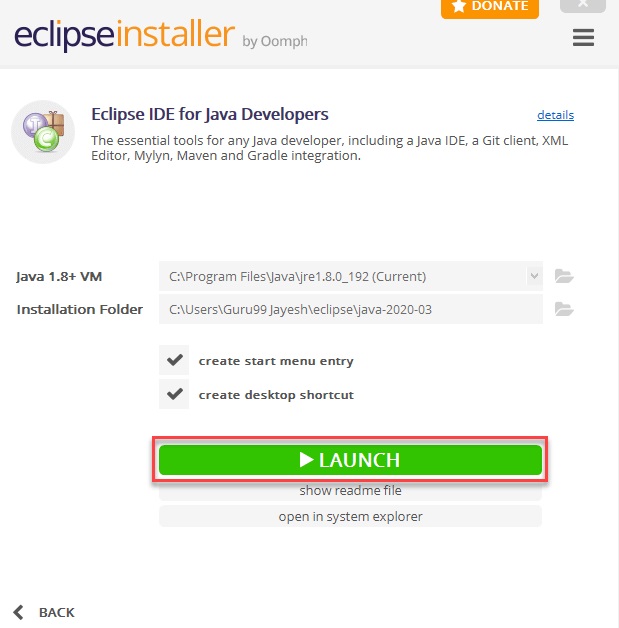
Step 7: Click on “INSTALL” button

Step 8: Click on “LAUNCH” button.
The post Download and Install Eclipse to Run Hibernate appeared first on OctopusCodes.
]]>The post Like in Raw SQL Queries in Entity Framework Core appeared first on OctopusCodes.
]]>using EntityFrameworkCore_ConsoleApp.Models;
using Microsoft.EntityFrameworkCore;
namespace EntityFrameworkCore_ConsoleApp
{
public class Program
{
static void Main(string[] args)
{
using (var databaseContext = new DatabaseContext())
{
var products = databaseContext.Products.FromSqlRaw("select * from product where name like {0}", "%vi%").ToList();
products.ForEach(product =>
{
Console.WriteLine("Id: " + product.Id);
Console.WriteLine("Name: " + product.Name);
Console.WriteLine("Price: " + product.Price);
Console.WriteLine("Quantity: " + product.Quantity);
Console.WriteLine("Description: " + product.Description);
Console.WriteLine("Status: " + product.Status);
Console.WriteLine("Photo: " + product.Photo);
Console.WriteLine("Created: " + product.Created.ToString("dd/MM/yyyy"));
Console.WriteLine("Category Id: " + product.CategoryId);
Console.WriteLine("---------------------");
});
}
}
}
}
Output
Id: 9
Name: Tivi 1
Price: 10
Quantity: 15
Description: Description 1
Status: True
Photo: photo1.gif
Created: 20/10/2023
Category Id: 1
---------------------
Id: 10
Name: Tivi 2
Price: 5
Quantity: 22
Description: Description 2
Status: False
Photo: photo2.gif
Created: 20/04/2022
Category Id: 1
---------------------
Id: 11
Name: Tivi 3
Price: 20
Quantity: 4
Description: Description 2
Status: False
Photo: photo3.gif
Created: 20/11/2022
Category Id: 1
---------------------
You can find whether a sequence starts with a certain term as below:
using EntityFrameworkCore_ConsoleApp.Models;
using Microsoft.EntityFrameworkCore;

namespace EntityFrameworkCore_ConsoleApp
{
    public class Program
    {
        static void Main(string[] args)
        {
            using (var databaseContext = new DatabaseContext())
            {
                var products = databaseContext.Products.FromSqlRaw("select * from product where name like {0}", "tivi%").ToList();
                products.ForEach(product =>
                {
                    Console.WriteLine("Id: " + product.Id);
                    Console.WriteLine("Name: " + product.Name);
                    Console.WriteLine("Price: " + product.Price);
                    Console.WriteLine("Quantity: " + product.Quantity);
                    Console.WriteLine("Description: " + product.Description);
                    Console.WriteLine("Status: " + product.Status);
                    Console.WriteLine("Photo: " + product.Photo);
                    Console.WriteLine("Created: " + product.Created.ToString("dd/MM/yyyy"));
                    Console.WriteLine("Category Id: " + product.CategoryId);
                    Console.WriteLine("---------------------");
                });
            }
        }
    }
}
Output
Id: 9
Name: Tivi 1
Price: 10
Quantity: 15
Description: Description 1
Status: True
Photo: photo1.gif
Created: 20/10/2023
Category Id: 1
---------------------
Id: 10
Name: Tivi 2
Price: 5
Quantity: 22
Description: Description 2
Status: False
Photo: photo2.gif
Created: 20/04/2022
Category Id: 1
---------------------
Id: 11
Name: Tivi 3
Price: 20
Quantity: 4
Description: Description 2
Status: False
Photo: photo3.gif
Created: 20/11/2022
Category Id: 1
---------------------
You can find whether a sequence ends with a certain term as below:
using EntityFrameworkCore_ConsoleApp.Models;
using Microsoft.EntityFrameworkCore;

namespace EntityFrameworkCore_ConsoleApp
{
    public class Program
    {
        static void Main(string[] args)
        {
            using (var databaseContext = new DatabaseContext())
            {
                var products = databaseContext.Products.FromSqlRaw("select * from product where name like {0}", "%top 1").ToList();
                products.ForEach(product =>
                {
                    Console.WriteLine("Id: " + product.Id);
                    Console.WriteLine("Name: " + product.Name);
                    Console.WriteLine("Price: " + product.Price);
                    Console.WriteLine("Quantity: " + product.Quantity);
                    Console.WriteLine("Description: " + product.Description);
                    Console.WriteLine("Status: " + product.Status);
                    Console.WriteLine("Photo: " + product.Photo);
                    Console.WriteLine("Created: " + product.Created.ToString("dd/MM/yyyy"));
                    Console.WriteLine("Category Id: " + product.CategoryId);
                    Console.WriteLine("---------------------");
                });
            }
        }
    }
}
Output
Id: 12
Name: Laptop 1
Price: 15
Quantity: 16
Description: Description 3
Status: True
Photo: photo4.gif
Created: 20/10/2021
Category Id: 2
---------------------
The post Like in Raw SQL Queries in Entity Framework Core appeared first on OctopusCodes.
]]>The post Skip in Raw SQL Queries in Entity Framework Core appeared first on OctopusCodes.
]]>using EntityFrameworkCore_ConsoleApp.Models;
using Microsoft.EntityFrameworkCore;
namespace EntityFrameworkCore_ConsoleApp
{
public class Program
{
static void Main(string[] args)
{
using (var databaseContext = new DatabaseContext())
{
var products = databaseContext.Products.FromSqlRaw("select * from product").Skip(2).ToList();
products.ForEach(product =>
{
Console.WriteLine("Id: " + product.Id);
Console.WriteLine("Name: " + product.Name);
Console.WriteLine("Price: " + product.Price);
Console.WriteLine("Quantity: " + product.Quantity);
Console.WriteLine("Description: " + product.Description);
Console.WriteLine("Status: " + product.Status);
Console.WriteLine("Photo: " + product.Photo);
Console.WriteLine("Created: " + product.Created.ToString("dd/MM/yyyy"));
Console.WriteLine("Category Id: " + product.CategoryId);
Console.WriteLine("---------------------");
});
}
}
}
}
Output
Id: 11
Name: Tivi 3
Price: 20
Quantity: 4
Description: Description 2
Status: False
Photo: photo3.gif
Created: 20/11/2022
Category Id: 1
---------------------
Id: 12
Name: Laptop 1
Price: 15
Quantity: 16
Description: Description 3
Status: True
Photo: photo4.gif
Created: 20/10/2021
Category Id: 2
---------------------
Id: 13
Name: Laptop 2
Price: 4
Quantity: 26
Description: Description 4
Status: False
Photo: photo5.gif
Created: 20/10/2022
Category Id: 2
---------------------
Id: 14
Name: Computer 1
Price: 17
Quantity: 34
Description: Description 5
Status: True
Photo: photo6.gif
Created: 20/12/2023
Category Id: 3
---------------------
Id: 15
Name: Computer 2
Price: 43
Quantity: 11
Description: Description 6
Status: False
Photo: photo7.gif
Created: 20/11/2023
Category Id: 3
---------------------
Id: 16
Name: Computer 3
Price: 19
Quantity: 18
Description: Description 7
Status: True
Photo: photo8.gif
Created: 20/05/2023
Category Id: 3
---------------------
You can use combination of Skip method and Take method as below:
using EntityFrameworkCore_ConsoleApp.Models;
using Microsoft.EntityFrameworkCore;

namespace EntityFrameworkCore_ConsoleApp
{
    public class Program
    {
        static void Main(string[] args)
        {
            using (var databaseContext = new DatabaseContext())
            {
                var products = databaseContext.Products.FromSqlRaw("select * from product").Skip(2).Take(3).ToList();
                products.ForEach(product =>
                {
                    Console.WriteLine("Id: " + product.Id);
                    Console.WriteLine("Name: " + product.Name);
                    Console.WriteLine("Price: " + product.Price);
                    Console.WriteLine("Quantity: " + product.Quantity);
                    Console.WriteLine("Description: " + product.Description);
                    Console.WriteLine("Status: " + product.Status);
                    Console.WriteLine("Photo: " + product.Photo);
                    Console.WriteLine("Created: " + product.Created.ToString("dd/MM/yyyy"));
                    Console.WriteLine("Category Id: " + product.CategoryId);
                    Console.WriteLine("---------------------");
                });
            }
        }
    }
}
Output
Id: 11
Name: Tivi 3
Price: 20
Quantity: 4
Description: Description 2
Status: False
Photo: photo3.gif
Created: 20/11/2022
Category Id: 1
---------------------
Id: 12
Name: Laptop 1
Price: 15
Quantity: 16
Description: Description 3
Status: True
Photo: photo4.gif
Created: 20/10/2021
Category Id: 2
---------------------
Id: 13
Name: Laptop 2
Price: 4
Quantity: 26
Description: Description 4
Status: False
Photo: photo5.gif
Created: 20/10/2022
Category Id: 2
---------------------
You can use combination of Skip method and Take method and Where as below:
using EntityFrameworkCore_ConsoleApp.Models;
using Microsoft.EntityFrameworkCore;

namespace EntityFrameworkCore_ConsoleApp
{
    public class Program
    {
        static void Main(string[] args)
        {
            using (var databaseContext = new DatabaseContext())
            {
                var products = databaseContext.Products.FromSqlRaw("select * from product where status = {0}", true).Skip(1).Take(2).ToList();
                products.ForEach(product =>
                {
                    Console.WriteLine("Id: " + product.Id);
                    Console.WriteLine("Name: " + product.Name);
                    Console.WriteLine("Price: " + product.Price);
                    Console.WriteLine("Quantity: " + product.Quantity);
                    Console.WriteLine("Description: " + product.Description);
                    Console.WriteLine("Status: " + product.Status);
                    Console.WriteLine("Photo: " + product.Photo);
                    Console.WriteLine("Created: " + product.Created.ToString("dd/MM/yyyy"));
                    Console.WriteLine("Category Id: " + product.CategoryId);
                    Console.WriteLine("---------------------");
                });
            }
        }
    }
}
Output
Id: 12
Name: Laptop 1
Price: 15
Quantity: 16
Description: Description 3
Status: True
Photo: photo4.gif
Created: 20/10/2021
Category Id: 2
---------------------
Id: 14
Name: Computer 1
Price: 17
Quantity: 34
Description: Description 5
Status: True
Photo: photo6.gif
Created: 20/12/2023
Category Id: 3
---------------------
You can use combination of Skip method and Take method and Where and OrderBy method as below:
using EntityFrameworkCore_ConsoleApp.Models;
using Microsoft.EntityFrameworkCore;

namespace EntityFrameworkCore_ConsoleApp
{
    public class Program
    {
        static void Main(string[] args)
        {
            using (var databaseContext = new DatabaseContext())
            {
                var products = databaseContext.Products.FromSqlRaw("select * from product where status = {0}", true).OrderBy(product => product.Price).Skip(1).Take(2).ToList();
                products.ForEach(product =>
                {
                    Console.WriteLine("Id: " + product.Id);
                    Console.WriteLine("Name: " + product.Name);
                    Console.WriteLine("Price: " + product.Price);
                    Console.WriteLine("Quantity: " + product.Quantity);
                    Console.WriteLine("Description: " + product.Description);
                    Console.WriteLine("Status: " + product.Status);
                    Console.WriteLine("Photo: " + product.Photo);
                    Console.WriteLine("Created: " + product.Created.ToString("dd/MM/yyyy"));
                    Console.WriteLine("Category Id: " + product.CategoryId);
                    Console.WriteLine("---------------------");
                });
            }
        }
    }
}
Output
Id: 12
Name: Laptop 1
Price: 15
Quantity: 16
Description: Description 3
Status: True
Photo: photo4.gif
Created: 20/10/2021
Category Id: 2
---------------------
Id: 14
Name: Computer 1
Price: 17
Quantity: 34
Description: Description 5
Status: True
Photo: photo6.gif
Created: 20/12/2023
Category Id: 3
---------------------
The post Skip in Raw SQL Queries in Entity Framework Core appeared first on OctopusCodes.
]]>The post Take in Raw SQL Queries in Entity Framework Core appeared first on OctopusCodes.
]]>using EntityFrameworkCore_ConsoleApp.Models;
using Microsoft.EntityFrameworkCore;
namespace EntityFrameworkCore_ConsoleApp
{
public class Program
{
static void Main(string[] args)
{
using (var databaseContext = new DatabaseContext())
{
var products = databaseContext.Products.FromSqlRaw("select * from product").Take(2).ToList();
products.ForEach(product =>
{
Console.WriteLine("Id: " + product.Id);
Console.WriteLine("Name: " + product.Name);
Console.WriteLine("Price: " + product.Price);
Console.WriteLine("Quantity: " + product.Quantity);
Console.WriteLine("Description: " + product.Description);
Console.WriteLine("Status: " + product.Status);
Console.WriteLine("Photo: " + product.Photo);
Console.WriteLine("Created: " + product.Created.ToString("dd/MM/yyyy"));
Console.WriteLine("Category Id: " + product.CategoryId);
Console.WriteLine("---------------------");
});
}
}
}
}
Output
Id: 9
Name: Tivi 1
Price: 10
Quantity: 15
Description: Description 1
Status: True
Photo: photo1.gif
Created: 20/10/2023
Category Id: 1
---------------------
Id: 10
Name: Tivi 2
Price: 5
Quantity: 22
Description: Description 2
Status: False
Photo: photo2.gif
Created: 20/04/2022
Category Id: 1
---------------------
You can use combination of Take method and Where as below:
using EntityFrameworkCore_ConsoleApp.Models;
using Microsoft.EntityFrameworkCore;

namespace EntityFrameworkCore_ConsoleApp
{
    public class Program
    {
        static void Main(string[] args)
        {
            using (var databaseContext = new DatabaseContext())
            {
                var products = databaseContext.Products.FromSqlRaw("select * from product where status = {0}", true).Take(2).ToList();
                products.ForEach(product =>
                {
                    Console.WriteLine("Id: " + product.Id);
                    Console.WriteLine("Name: " + product.Name);
                    Console.WriteLine("Price: " + product.Price);
                    Console.WriteLine("Quantity: " + product.Quantity);
                    Console.WriteLine("Description: " + product.Description);
                    Console.WriteLine("Status: " + product.Status);
                    Console.WriteLine("Photo: " + product.Photo);
                    Console.WriteLine("Created: " + product.Created.ToString("dd/MM/yyyy"));
                    Console.WriteLine("Category Id: " + product.CategoryId);
                    Console.WriteLine("---------------------");
                });
            }
        }
    }
}
Output
Id: 9
Name: Tivi 1
Price: 10
Quantity: 15
Description: Description 1
Status: True
Photo: photo1.gif
Created: 20/10/2023
Category Id: 1
---------------------
Id: 12
Name: Laptop 1
Price: 15
Quantity: 16
Description: Description 3
Status: True
Photo: photo4.gif
Created: 20/10/2021
Category Id: 2
---------------------
You can use combination of Take method and Where and OrderByDescending method as below:
using EntityFrameworkCore_ConsoleApp.Models;
using Microsoft.EntityFrameworkCore;

namespace EntityFrameworkCore_ConsoleApp
{
    public class Program
    {
        static void Main(string[] args)
        {
            using (var databaseContext = new DatabaseContext())
            {
                var products = databaseContext.Products.FromSqlRaw("select * from product where status = {0}", true).OrderByDescending(product => product.Price).Take(2).ToList();
                products.ForEach(product =>
                {
                    Console.WriteLine("Id: " + product.Id);
                    Console.WriteLine("Name: " + product.Name);
                    Console.WriteLine("Price: " + product.Price);
                    Console.WriteLine("Quantity: " + product.Quantity);
                    Console.WriteLine("Description: " + product.Description);
                    Console.WriteLine("Status: " + product.Status);
                    Console.WriteLine("Photo: " + product.Photo);
                    Console.WriteLine("Created: " + product.Created.ToString("dd/MM/yyyy"));
                    Console.WriteLine("Category Id: " + product.CategoryId);
                    Console.WriteLine("---------------------");
                });
            }
        }
    }
}
Output
Id: 16
Name: Computer 3
Price: 19
Quantity: 18
Description: Description 7
Status: True
Photo: photo8.gif
Created: 20/05/2023
Category Id: 3
---------------------
Id: 14
Name: Computer 1
Price: 17
Quantity: 34
Description: Description 5
Status: True
Photo: photo6.gif
Created: 20/12/2023
Category Id: 3
---------------------
The post Take in Raw SQL Queries in Entity Framework Core appeared first on OctopusCodes.
]]>The post OrderByDescending in Raw SQL Queries in Entity Framework Core appeared first on OctopusCodes.
]]>using EntityFrameworkCore_ConsoleApp.Models;
using Microsoft.EntityFrameworkCore;
namespace EntityFrameworkCore_ConsoleApp
{
public class Program
{
static void Main(string[] args)
{
using (var databaseContext = new DatabaseContext())
{
var products = databaseContext.Products.FromSqlRaw("select * from product order by price desc").ToList();
products.ForEach(product =>
{
Console.WriteLine("Id: " + product.Id);
Console.WriteLine("Name: " + product.Name);
Console.WriteLine("Price: " + product.Price);
Console.WriteLine("Quantity: " + product.Quantity);
Console.WriteLine("Description: " + product.Description);
Console.WriteLine("Status: " + product.Status);
Console.WriteLine("Photo: " + product.Photo);
Console.WriteLine("Created: " + product.Created.ToString("dd/MM/yyyy"));
Console.WriteLine("Category Id: " + product.CategoryId);
Console.WriteLine("---------------------");
});
}
}
}
}
Output
Id: 15
Name: Computer 2
Price: 43
Quantity: 11
Description: Description 6
Status: False
Photo: photo7.gif
Created: 20/11/2023
Category Id: 3
---------------------
Id: 11
Name: Tivi 3
Price: 20
Quantity: 4
Description: Description 2
Status: False
Photo: photo3.gif
Created: 20/11/2022
Category Id: 1
---------------------
Id: 16
Name: Computer 3
Price: 19
Quantity: 18
Description: Description 7
Status: True
Photo: photo8.gif
Created: 20/05/2023
Category Id: 3
---------------------
Id: 14
Name: Computer 1
Price: 17
Quantity: 34
Description: Description 5
Status: True
Photo: photo6.gif
Created: 20/12/2023
Category Id: 3
---------------------
Id: 12
Name: Laptop 1
Price: 15
Quantity: 16
Description: Description 3
Status: True
Photo: photo4.gif
Created: 20/10/2021
Category Id: 2
---------------------
Id: 9
Name: Tivi 1
Price: 10
Quantity: 15
Description: Description 1
Status: True
Photo: photo1.gif
Created: 20/10/2023
Category Id: 1
---------------------
Id: 10
Name: Tivi 2
Price: 5
Quantity: 22
Description: Description 2
Status: False
Photo: photo2.gif
Created: 20/04/2022
Category Id: 1
---------------------
Id: 13
Name: Laptop 2
Price: 4
Quantity: 26
Description: Description 4
Status: False
Photo: photo5.gif
Created: 20/10/2022
Category Id: 2
---------------------
You can sort data by OrderByDescending method and FromSqlRaw method as below:
using EntityFrameworkCore_ConsoleApp.Models;
using Microsoft.EntityFrameworkCore;

namespace EntityFrameworkCore_ConsoleApp
{
    public class Program
    {
        static void Main(string[] args)
        {
            using (var databaseContext = new DatabaseContext())
            {
                var products = databaseContext.Products.FromSqlRaw("select * from product").OrderByDescending(product => product.Price).ToList();
                products.ForEach(product =>
                {
                    Console.WriteLine("Id: " + product.Id);
                    Console.WriteLine("Name: " + product.Name);
                    Console.WriteLine("Price: " + product.Price);
                    Console.WriteLine("Quantity: " + product.Quantity);
                    Console.WriteLine("Description: " + product.Description);
                    Console.WriteLine("Status: " + product.Status);
                    Console.WriteLine("Photo: " + product.Photo);
                    Console.WriteLine("Created: " + product.Created.ToString("dd/MM/yyyy"));
                    Console.WriteLine("Category Id: " + product.CategoryId);
                    Console.WriteLine("---------------------");
                });
            }
        }
    }
}
Output
Id: 15
Name: Computer 2
Price: 43
Quantity: 11
Description: Description 6
Status: False
Photo: photo7.gif
Created: 20/11/2023
Category Id: 3
---------------------
Id: 11
Name: Tivi 3
Price: 20
Quantity: 4
Description: Description 2
Status: False
Photo: photo3.gif
Created: 20/11/2022
Category Id: 1
---------------------
Id: 16
Name: Computer 3
Price: 19
Quantity: 18
Description: Description 7
Status: True
Photo: photo8.gif
Created: 20/05/2023
Category Id: 3
---------------------
Id: 14
Name: Computer 1
Price: 17
Quantity: 34
Description: Description 5
Status: True
Photo: photo6.gif
Created: 20/12/2023
Category Id: 3
---------------------
Id: 12
Name: Laptop 1
Price: 15
Quantity: 16
Description: Description 3
Status: True
Photo: photo4.gif
Created: 20/10/2021
Category Id: 2
---------------------
Id: 9
Name: Tivi 1
Price: 10
Quantity: 15
Description: Description 1
Status: True
Photo: photo1.gif
Created: 20/10/2023
Category Id: 1
---------------------
Id: 10
Name: Tivi 2
Price: 5
Quantity: 22
Description: Description 2
Status: False
Photo: photo2.gif
Created: 20/04/2022
Category Id: 1
---------------------
Id: 13
Name: Laptop 2
Price: 4
Quantity: 26
Description: Description 4
Status: False
Photo: photo5.gif
Created: 20/10/2022
Category Id: 2
---------------------
You can use combination of OrderByDescending and Where as below:
using EntityFrameworkCore_ConsoleApp.Models;
using Microsoft.EntityFrameworkCore;

namespace EntityFrameworkCore_ConsoleApp
{
    public class Program
    {
        static void Main(string[] args)
        {
            using (var databaseContext = new DatabaseContext())
            {
                var products = databaseContext.Products.FromSqlRaw("select * from product where status = {0}", true).OrderByDescending(product => product.Price).ToList();
                products.ForEach(product =>
                {
                    Console.WriteLine("Id: " + product.Id);
                    Console.WriteLine("Name: " + product.Name);
                    Console.WriteLine("Price: " + product.Price);
                    Console.WriteLine("Quantity: " + product.Quantity);
                    Console.WriteLine("Description: " + product.Description);
                    Console.WriteLine("Status: " + product.Status);
                    Console.WriteLine("Photo: " + product.Photo);
                    Console.WriteLine("Created: " + product.Created.ToString("dd/MM/yyyy"));
                    Console.WriteLine("Category Id: " + product.CategoryId);
                    Console.WriteLine("---------------------");
                });
            }
        }
    }
}
Output
Id: 16
Name: Computer 3
Price: 19
Quantity: 18
Description: Description 7
Status: True
Photo: photo8.gif
Created: 20/05/2023
Category Id: 3
---------------------
Id: 14
Name: Computer 1
Price: 17
Quantity: 34
Description: Description 5
Status: True
Photo: photo6.gif
Created: 20/12/2023
Category Id: 3
---------------------
Id: 12
Name: Laptop 1
Price: 15
Quantity: 16
Description: Description 3
Status: True
Photo: photo4.gif
Created: 20/10/2021
Category Id: 2
---------------------
Id: 9
Name: Tivi 1
Price: 10
Quantity: 15
Description: Description 1
Status: True
Photo: photo1.gif
Created: 20/10/2023
Category Id: 1
---------------------
The post OrderByDescending in Raw SQL Queries in Entity Framework Core appeared first on OctopusCodes.
]]>The post OrderBy in Raw SQL Queries in Entity Framework Core appeared first on OctopusCodes.
]]>using EntityFrameworkCore_ConsoleApp.Models;
using Microsoft.EntityFrameworkCore;
namespace EntityFrameworkCore_ConsoleApp
{
public class Program
{
static void Main(string[] args)
{
using (var databaseContext = new DatabaseContext())
{
var products = databaseContext.Products.FromSqlRaw("select * from product order by price asc").ToList();
products.ForEach(product =>
{
Console.WriteLine("Id: " + product.Id);
Console.WriteLine("Name: " + product.Name);
Console.WriteLine("Price: " + product.Price);
Console.WriteLine("Quantity: " + product.Quantity);
Console.WriteLine("Description: " + product.Description);
Console.WriteLine("Status: " + product.Status);
Console.WriteLine("Photo: " + product.Photo);
Console.WriteLine("Created: " + product.Created.ToString("dd/MM/yyyy"));
Console.WriteLine("Category Id: " + product.CategoryId);
Console.WriteLine("---------------------");
});
}
}
}
}
Output
Id: 13
Name: Laptop 2
Price: 4
Quantity: 26
Description: Description 4
Status: False
Photo: photo5.gif
Created: 20/10/2022
Category Id: 2
---------------------
Id: 10
Name: Tivi 2
Price: 5
Quantity: 22
Description: Description 2
Status: False
Photo: photo2.gif
Created: 20/04/2022
Category Id: 1
---------------------
Id: 9
Name: Tivi 1
Price: 10
Quantity: 15
Description: Description 1
Status: True
Photo: photo1.gif
Created: 20/10/2023
Category Id: 1
---------------------
Id: 12
Name: Laptop 1
Price: 15
Quantity: 16
Description: Description 3
Status: True
Photo: photo4.gif
Created: 20/10/2021
Category Id: 2
---------------------
Id: 14
Name: Computer 1
Price: 17
Quantity: 34
Description: Description 5
Status: True
Photo: photo6.gif
Created: 20/12/2023
Category Id: 3
---------------------
Id: 16
Name: Computer 3
Price: 19
Quantity: 18
Description: Description 7
Status: True
Photo: photo8.gif
Created: 20/05/2023
Category Id: 3
---------------------
Id: 11
Name: Tivi 3
Price: 20
Quantity: 4
Description: Description 2
Status: False
Photo: photo3.gif
Created: 20/11/2022
Category Id: 1
---------------------
Id: 15
Name: Computer 2
Price: 43
Quantity: 11
Description: Description 6
Status: False
Photo: photo7.gif
Created: 20/11/2023
Category Id: 3
---------------------
You can sort data by OrderBy method and FromSqlRaw method as below:
using EntityFrameworkCore_ConsoleApp.Models;
using Microsoft.EntityFrameworkCore;

namespace EntityFrameworkCore_ConsoleApp
{
    public class Program
    {
        static void Main(string[] args)
        {
            using (var databaseContext = new DatabaseContext())
            {
                var products = databaseContext.Products.FromSqlRaw("select * from product").OrderBy(product => product.Price).ToList();
                products.ForEach(product =>
                {
                    Console.WriteLine("Id: " + product.Id);
                    Console.WriteLine("Name: " + product.Name);
                    Console.WriteLine("Price: " + product.Price);
                    Console.WriteLine("Quantity: " + product.Quantity);
                    Console.WriteLine("Description: " + product.Description);
                    Console.WriteLine("Status: " + product.Status);
                    Console.WriteLine("Photo: " + product.Photo);
                    Console.WriteLine("Created: " + product.Created.ToString("dd/MM/yyyy"));
                    Console.WriteLine("Category Id: " + product.CategoryId);
                    Console.WriteLine("---------------------");
                });
            }
        }
    }
}
Output
Id: 13
Name: Laptop 2
Price: 4
Quantity: 26
Description: Description 4
Status: False
Photo: photo5.gif
Created: 20/10/2022
Category Id: 2
---------------------
Id: 10
Name: Tivi 2
Price: 5
Quantity: 22
Description: Description 2
Status: False
Photo: photo2.gif
Created: 20/04/2022
Category Id: 1
---------------------
Id: 9
Name: Tivi 1
Price: 10
Quantity: 15
Description: Description 1
Status: True
Photo: photo1.gif
Created: 20/10/2023
Category Id: 1
---------------------
Id: 12
Name: Laptop 1
Price: 15
Quantity: 16
Description: Description 3
Status: True
Photo: photo4.gif
Created: 20/10/2021
Category Id: 2
---------------------
Id: 14
Name: Computer 1
Price: 17
Quantity: 34
Description: Description 5
Status: True
Photo: photo6.gif
Created: 20/12/2023
Category Id: 3
---------------------
Id: 16
Name: Computer 3
Price: 19
Quantity: 18
Description: Description 7
Status: True
Photo: photo8.gif
Created: 20/05/2023
Category Id: 3
---------------------
Id: 11
Name: Tivi 3
Price: 20
Quantity: 4
Description: Description 2
Status: False
Photo: photo3.gif
Created: 20/11/2022
Category Id: 1
---------------------
Id: 15
Name: Computer 2
Price: 43
Quantity: 11
Description: Description 6
Status: False
Photo: photo7.gif
Created: 20/11/2023
Category Id: 3
---------------------
You can use combination of OrderBy and Where as below:
using EntityFrameworkCore_ConsoleApp.Models;
using Microsoft.EntityFrameworkCore;

namespace EntityFrameworkCore_ConsoleApp
{
    public class Program
    {
        static void Main(string[] args)
        {
            using (var databaseContext = new DatabaseContext())
            {
                var products = databaseContext.Products.FromSqlRaw("select * from product where status = {0}", true).OrderBy(product => product.Price).ToList();
                products.ForEach(product =>
                {
                    Console.WriteLine("Id: " + product.Id);
                    Console.WriteLine("Name: " + product.Name);
                    Console.WriteLine("Price: " + product.Price);
                    Console.WriteLine("Quantity: " + product.Quantity);
                    Console.WriteLine("Description: " + product.Description);
                    Console.WriteLine("Status: " + product.Status);
                    Console.WriteLine("Photo: " + product.Photo);
                    Console.WriteLine("Created: " + product.Created.ToString("dd/MM/yyyy"));
                    Console.WriteLine("Category Id: " + product.CategoryId);
                    Console.WriteLine("---------------------");
                });
            }
        }
    }
}
Output
Id: 9
Name: Tivi 1
Price: 10
Quantity: 15
Description: Description 1
Status: True
Photo: photo1.gif
Created: 20/10/2023
Category Id: 1
---------------------
Id: 12
Name: Laptop 1
Price: 15
Quantity: 16
Description: Description 3
Status: True
Photo: photo4.gif
Created: 20/10/2021
Category Id: 2
---------------------
Id: 14
Name: Computer 1
Price: 17
Quantity: 34
Description: Description 5
Status: True
Photo: photo6.gif
Created: 20/12/2023
Category Id: 3
---------------------
Id: 16
Name: Computer 3
Price: 19
Quantity: 18
Description: Description 7
Status: True
Photo: photo8.gif
Created: 20/05/2023
Category Id: 3
---------------------
The post OrderBy in Raw SQL Queries in Entity Framework Core appeared first on OctopusCodes.
]]>The post Parameters in Raw SQL Queries with FromSqlRaw Method in Entity Framework Core appeared first on OctopusCodes.
]]>using EntityFrameworkCore_ConsoleApp.Models;
using Microsoft.Data.SqlClient;
using Microsoft.EntityFrameworkCore;
namespace EntityFrameworkCore_ConsoleApp
{
public class Program
{
static void Main(string[] args)
{
using (var databaseContext = new DatabaseContext())
{
var status = true;
var products = databaseContext.Products.FromSqlRaw("select * from product where status = {0}", status).ToList();
products.ForEach(product =>
{
Console.WriteLine("Id: " + product.Id);
Console.WriteLine("Name: " + product.Name);
Console.WriteLine("Price: " + product.Price);
Console.WriteLine("Quantity: " + product.Quantity);
Console.WriteLine("Description: " + product.Description);
Console.WriteLine("Status: " + product.Status);
Console.WriteLine("Photo: " + product.Photo);
Console.WriteLine("Created: " + product.Created.ToString("dd/MM/yyyy"));
Console.WriteLine("Category Id: " + product.CategoryId);
Console.WriteLine("---------------------");
});
}
}
}
}
Output
Id: 9
Name: Tivi 1
Price: 10
Quantity: 15
Description: Description 1
Status: True
Photo: photo1.gif
Created: 20/10/2023
Category Id: 1
---------------------
Id: 12
Name: Laptop 1
Price: 15
Quantity: 16
Description: Description 3
Status: True
Photo: photo4.gif
Created: 20/10/2021
Category Id: 2
---------------------
Id: 14
Name: Computer 1
Price: 17
Quantity: 34
Description: Description 5
Status: True
Photo: photo6.gif
Created: 20/12/2023
Category Id: 3
---------------------
Id: 16
Name: Computer 3
Price: 19
Quantity: 18
Description: Description 7
Status: True
Photo: photo8.gif
Created: 20/05/2023
Category Id: 3
---------------------
Use AND condition in Where:
using EntityFrameworkCore_ConsoleApp.Models;
using Microsoft.Data.SqlClient;
using Microsoft.EntityFrameworkCore;

namespace EntityFrameworkCore_ConsoleApp
{
    public class Program
    {
        static void Main(string[] args)
        {
            using (var databaseContext = new DatabaseContext())
            {
                var min = 5;
                var max = 20;
                var products = databaseContext.Products.FromSqlRaw("select * from product where price >= {0} and price <= {1}", min, max).ToList();
                products.ForEach(product =>
                {
                    Console.WriteLine("Id: " + product.Id);
                    Console.WriteLine("Name: " + product.Name);
                    Console.WriteLine("Price: " + product.Price);
                    Console.WriteLine("Quantity: " + product.Quantity);
                    Console.WriteLine("Description: " + product.Description);
                    Console.WriteLine("Status: " + product.Status);
                    Console.WriteLine("Photo: " + product.Photo);
                    Console.WriteLine("Created: " + product.Created.ToString("dd/MM/yyyy"));
                    Console.WriteLine("Category Id: " + product.CategoryId);
                    Console.WriteLine("---------------------");
                });
            }
        }
    }
}
Output
Id: 9
Name: Tivi 1
Price: 10
Quantity: 15
Description: Description 1
Status: True
Photo: photo1.gif
Created: 20/10/2023
Category Id: 1
---------------------
Id: 10
Name: Tivi 2
Price: 5
Quantity: 22
Description: Description 2
Status: False
Photo: photo2.gif
Created: 20/04/2022
Category Id: 1
---------------------
Id: 11
Name: Tivi 3
Price: 20
Quantity: 4
Description: Description 2
Status: False
Photo: photo3.gif
Created: 20/11/2022
Category Id: 1
---------------------
Id: 12
Name: Laptop 1
Price: 15
Quantity: 16
Description: Description 3
Status: True
Photo: photo4.gif
Created: 20/10/2021
Category Id: 2
---------------------
Id: 14
Name: Computer 1
Price: 17
Quantity: 34
Description: Description 5
Status: True
Photo: photo6.gif
Created: 20/12/2023
Category Id: 3
---------------------
Id: 16
Name: Computer 3
Price: 19
Quantity: 18
Description: Description 7
Status: True
Photo: photo8.gif
Created: 20/05/2023
Category Id: 3
---------------------
Use OR condition in Where:
using EntityFrameworkCore_ConsoleApp.Models;
using Microsoft.Data.SqlClient;
using Microsoft.EntityFrameworkCore;

namespace EntityFrameworkCore_ConsoleApp
{
    public class Program
    {
        static void Main(string[] args)
        {
            using (var databaseContext = new DatabaseContext())
            {
                var price1 = 5;
                var price2 = 15;
                var price3 = 20;
                var products = databaseContext.Products.FromSqlRaw("select * from product where price = {0} or price = {1} or price = {2}", price1, price2, price3).ToList();
                products.ForEach(product =>
                {
                    Console.WriteLine("Id: " + product.Id);
                    Console.WriteLine("Name: " + product.Name);
                    Console.WriteLine("Price: " + product.Price);
                    Console.WriteLine("Quantity: " + product.Quantity);
                    Console.WriteLine("Description: " + product.Description);
                    Console.WriteLine("Status: " + product.Status);
                    Console.WriteLine("Photo: " + product.Photo);
                    Console.WriteLine("Created: " + product.Created.ToString("dd/MM/yyyy"));
                    Console.WriteLine("Category Id: " + product.CategoryId);
                    Console.WriteLine("---------------------");
                });
            }
        }
    }
}
Output
Id: 10
Name: Tivi 2
Price: 5
Quantity: 22
Description: Description 2
Status: False
Photo: photo2.gif
Created: 20/04/2022
Category Id: 1
---------------------
Id: 11
Name: Tivi 3
Price: 20
Quantity: 4
Description: Description 2
Status: False
Photo: photo3.gif
Created: 20/11/2022
Category Id: 1
---------------------
Id: 12
Name: Laptop 1
Price: 15
Quantity: 16
Description: Description 3
Status: True
Photo: photo4.gif
Created: 20/10/2021
Category Id: 2
---------------------
You can also pass parameters with the SqlParameter method as below:
using EntityFrameworkCore_ConsoleApp.Models;
using Microsoft.Data.SqlClient;
using Microsoft.EntityFrameworkCore;

namespace EntityFrameworkCore_ConsoleApp
{
    public class Program
    {
        static void Main(string[] args)
        {
            using (var databaseContext = new DatabaseContext())
            {
                var param1 = new SqlParameter("@min", 5);
                var param2 = new SqlParameter("@max", 20);
                var products = databaseContext.Products.FromSqlRaw("select * from product where price >= @min and price <= @max", param1, param2).ToList();
                products.ForEach(product =>
                {
                    Console.WriteLine("Id: " + product.Id);
                    Console.WriteLine("Name: " + product.Name);
                    Console.WriteLine("Price: " + product.Price);
                    Console.WriteLine("Quantity: " + product.Quantity);
                    Console.WriteLine("Description: " + product.Description);
                    Console.WriteLine("Status: " + product.Status);
                    Console.WriteLine("Photo: " + product.Photo);
                    Console.WriteLine("Created: " + product.Created.ToString("dd/MM/yyyy"));
                    Console.WriteLine("Category Id: " + product.CategoryId);
                    Console.WriteLine("---------------------");
                });
            }
        }
    }
}
Output
Id: 9
Name: Tivi 1
Price: 10
Quantity: 15
Description: Description 1
Status: True
Photo: photo1.gif
Created: 20/10/2023
Category Id: 1
---------------------
Id: 10
Name: Tivi 2
Price: 5
Quantity: 22
Description: Description 2
Status: False
Photo: photo2.gif
Created: 20/04/2022
Category Id: 1
---------------------
Id: 11
Name: Tivi 3
Price: 20
Quantity: 4
Description: Description 2
Status: False
Photo: photo3.gif
Created: 20/11/2022
Category Id: 1
---------------------
Id: 12
Name: Laptop 1
Price: 15
Quantity: 16
Description: Description 3
Status: True
Photo: photo4.gif
Created: 20/10/2021
Category Id: 2
---------------------
Id: 14
Name: Computer 1
Price: 17
Quantity: 34
Description: Description 5
Status: True
Photo: photo6.gif
Created: 20/12/2023
Category Id: 3
---------------------
Id: 16
Name: Computer 3
Price: 19
Quantity: 18
Description: Description 7
Status: True
Photo: photo8.gif
Created: 20/05/2023
Category Id: 3
---------------------
The post Parameters in Raw SQL Queries with FromSqlRaw Method in Entity Framework Core appeared first on OctopusCodes.
]]>The post Parameters in Raw SQL Queries with FromSql Method in Entity Framework Core appeared first on OctopusCodes.
]]>using EntityFrameworkCore_ConsoleApp.Models;
using Microsoft.EntityFrameworkCore;
namespace EntityFrameworkCore_ConsoleApp
{
public class Program
{
static void Main(string[] args)
{
using (var databaseContext = new DatabaseContext())
{
var status = true;
var products = databaseContext.Products.FromSql($"select * from product where status = {status}").ToList();
products.ForEach(product =>
{
Console.WriteLine("Id: " + product.Id);
Console.WriteLine("Name: " + product.Name);
Console.WriteLine("Price: " + product.Price);
Console.WriteLine("Quantity: " + product.Quantity);
Console.WriteLine("Description: " + product.Description);
Console.WriteLine("Status: " + product.Status);
Console.WriteLine("Photo: " + product.Photo);
Console.WriteLine("Created: " + product.Created.ToString("dd/MM/yyyy"));
Console.WriteLine("Category Id: " + product.CategoryId);
Console.WriteLine("---------------------");
});
}
}
}
}
Output
Id: 9
Name: Tivi 1
Price: 10
Quantity: 15
Description: Description 1
Status: True
Photo: photo1.gif
Created: 20/10/2023
Category Id: 1
---------------------
Id: 12
Name: Laptop 1
Price: 15
Quantity: 16
Description: Description 3
Status: True
Photo: photo4.gif
Created: 20/10/2021
Category Id: 2
---------------------
Id: 14
Name: Computer 1
Price: 17
Quantity: 34
Description: Description 5
Status: True
Photo: photo6.gif
Created: 20/12/2023
Category Id: 3
---------------------
Id: 16
Name: Computer 3
Price: 19
Quantity: 18
Description: Description 7
Status: True
Photo: photo8.gif
Created: 20/05/2023
Category Id: 3
---------------------
Use AND condition in Where:
using EntityFrameworkCore_ConsoleApp.Models;
using Microsoft.EntityFrameworkCore;

namespace EntityFrameworkCore_ConsoleApp
{
    public class Program
    {
        static void Main(string[] args)
        {
            using (var databaseContext = new DatabaseContext())
            {
                var min = 5;
                var max = 20;
                var products = databaseContext.Products.FromSql($"select * from product where price >= {min} and price <= {max}").ToList();
                products.ForEach(product =>
                {
                    Console.WriteLine("Id: " + product.Id);
                    Console.WriteLine("Name: " + product.Name);
                    Console.WriteLine("Price: " + product.Price);
                    Console.WriteLine("Quantity: " + product.Quantity);
                    Console.WriteLine("Description: " + product.Description);
                    Console.WriteLine("Status: " + product.Status);
                    Console.WriteLine("Photo: " + product.Photo);
                    Console.WriteLine("Created: " + product.Created.ToString("dd/MM/yyyy"));
                    Console.WriteLine("Category Id: " + product.CategoryId);
                    Console.WriteLine("---------------------");
                });
            }
        }
    }
}
Output
Id: 9
Name: Tivi 1
Price: 10
Quantity: 15
Description: Description 1
Status: True
Photo: photo1.gif
Created: 20/10/2023
Category Id: 1
---------------------
Id: 10
Name: Tivi 2
Price: 5
Quantity: 22
Description: Description 2
Status: False
Photo: photo2.gif
Created: 20/04/2022
Category Id: 1
---------------------
Id: 11
Name: Tivi 3
Price: 20
Quantity: 4
Description: Description 2
Status: False
Photo: photo3.gif
Created: 20/11/2022
Category Id: 1
---------------------
Id: 12
Name: Laptop 1
Price: 15
Quantity: 16
Description: Description 3
Status: True
Photo: photo4.gif
Created: 20/10/2021
Category Id: 2
---------------------
Id: 14
Name: Computer 1
Price: 17
Quantity: 34
Description: Description 5
Status: True
Photo: photo6.gif
Created: 20/12/2023
Category Id: 3
---------------------
Id: 16
Name: Computer 3
Price: 19
Quantity: 18
Description: Description 7
Status: True
Photo: photo8.gif
Created: 20/05/2023
Category Id: 3
---------------------
Use OR condition in Where:
using EntityFrameworkCore_ConsoleApp.Models;
using Microsoft.EntityFrameworkCore;

namespace EntityFrameworkCore_ConsoleApp
{
    public class Program
    {
        static void Main(string[] args)
        {
            using (var databaseContext = new DatabaseContext())
            {
                var price1 = 5;
                var price2 = 15;
                var price3 = 20;
                var products = databaseContext.Products.FromSql($"select * from product where price = {price1} or price = {price2} or price = {price3}").ToList();
                products.ForEach(product =>
                {
                    Console.WriteLine("Id: " + product.Id);
                    Console.WriteLine("Name: " + product.Name);
                    Console.WriteLine("Price: " + product.Price);
                    Console.WriteLine("Quantity: " + product.Quantity);
                    Console.WriteLine("Description: " + product.Description);
                    Console.WriteLine("Status: " + product.Status);
                    Console.WriteLine("Photo: " + product.Photo);
                    Console.WriteLine("Created: " + product.Created.ToString("dd/MM/yyyy"));
                    Console.WriteLine("Category Id: " + product.CategoryId);
                    Console.WriteLine("---------------------");
                });
            }
        }
    }
}
Output
Id: 10
Name: Tivi 2
Price: 5
Quantity: 22
Description: Description 2
Status: False
Photo: photo2.gif
Created: 20/04/2022
Category Id: 1
---------------------
Id: 11
Name: Tivi 3
Price: 20
Quantity: 4
Description: Description 2
Status: False
Photo: photo3.gif
Created: 20/11/2022
Category Id: 1
---------------------
Id: 12
Name: Laptop 1
Price: 15
Quantity: 16
Description: Description 3
Status: True
Photo: photo4.gif
Created: 20/10/2021
Category Id: 2
---------------------
The post Parameters in Raw SQL Queries with FromSql Method in Entity Framework Core appeared first on OctopusCodes.
]]>